
I've had Immich running on my Unraid server for a while now, mostly sitting there as a "someday I'll actually use this" project. The someday finally happened when I found ImmiBridge, a macOS app built specifically to pull photos out of Apple Photos and push them into a self hosted Immich instance.
The Pitch
Apple has my entire photo library, decades of it, sitting in iCloud, a place I don't control (other than making sure the auto pay clears each month). I have my photos go to Google Photos and iCloud but I really want this stuff to also live on my servers as well. ImmiBridge closes that gap by copying everything down to a Mac and syncing it straight into Immich, which lives on hardware I control.
Server Setup
Setup on the Immich side was nothing new if you've run it before. It's already deployed as a container on my Unraid box, backed by its own Postgres database and a library folder on the array. The only real prep was generating an API key from Immich's user settings so ImmiBridge had something to authenticate with.
Mac Setup
On the Mac side, ImmiBridge asks for Photos access, then lets you point it at a destination. You can export to a local folder organized by date, sync to an Immich server, or do both. I went straight for the Immich path since that's the whole point of the exercise.
Then I just let it run, with the help of Amphetamine and MacOS App that keeps your mac awake. If you do any vibe coding projects there is a bunch of these apps out there, I've been using Amphetamine before any of this AI craze.
Let is cook
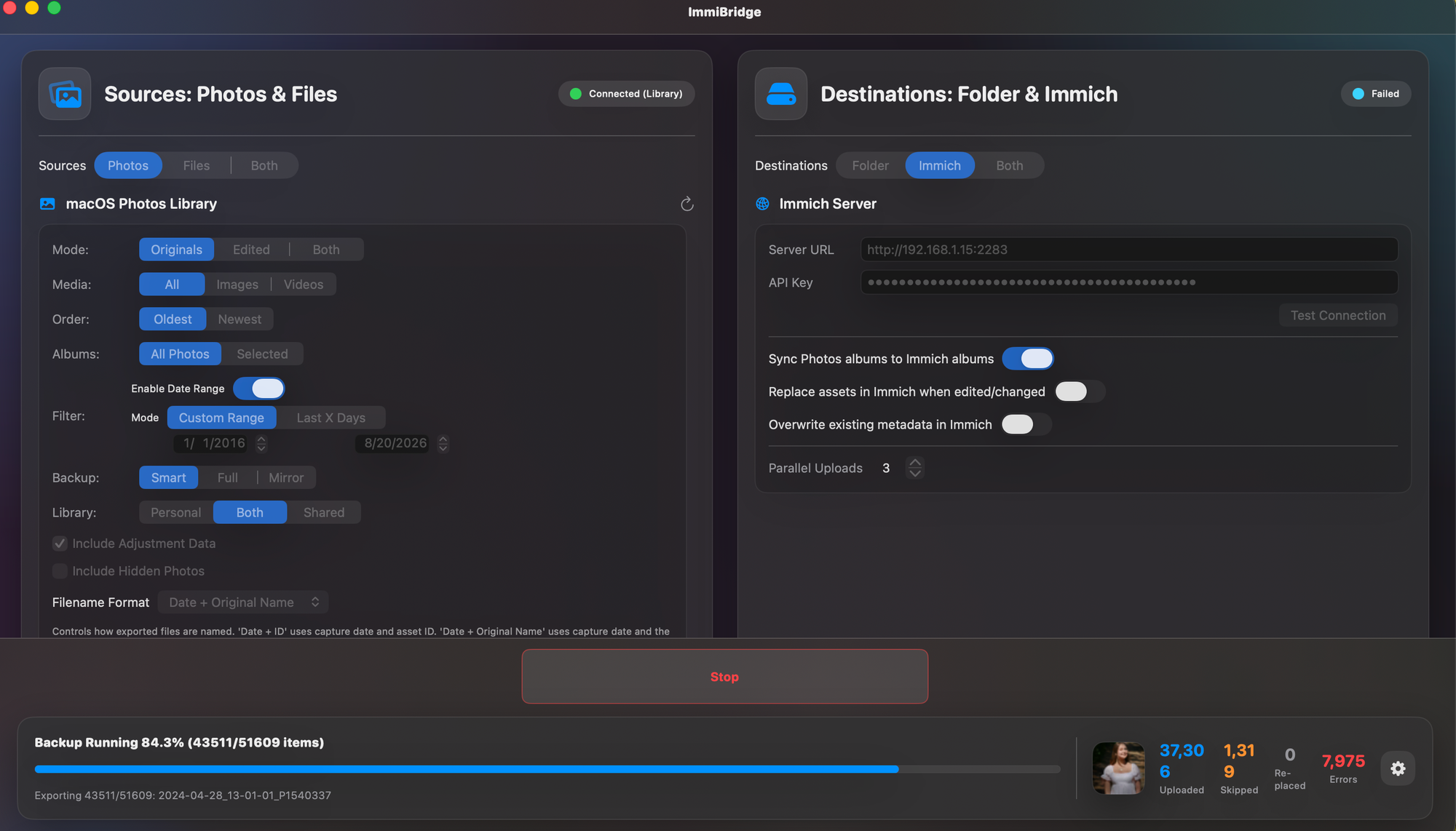
My library is not small. Over the course of a weekend, ImmiBridge pulled and synced roughly 51,000 photos and videos from iCloud into Immich. That number includes Live Photos, which get exported as a paired still image and video rather than getting flattened into something lossy. It also handles duplicate detection using SHA1 checksums, so nothing gets uploaded twice if a sync gets interrupted and restarted.
Some issues
A few things stood out while I was watching it work. The Test Connection button didn't work for me, I kept getting errors due to not using TLS since I was just hitting the ip address of the server with port from my laptop to the Unraid server. Maybe an exclude TLS option would be nice? I spend about 10 mins trying various things before realizing I should just hit start and see what happens.
I also ran into a connection issue with an early build against a specific server version, which turned out to be a version mismatch rather than anything wrong with my Immich setup. Worth checking your server version against what the app expects if a connection attempt just sits there.
My wishlist
The one feature I keep wanting is a way to exclude screenshots from the sync. Fourteen years of iPhone screenshots is not something I need cluttering up a photo library that's supposed to be about actual photos. I posted the request in the project's community thread, so hopefully that lands in a future release. I'd also like to see if there is a way to exclude junk photos. I know it sounds weird but if you work in any trade you are going to have photos of ducts, above ceiling tiles and macro images of the top of a screw that you may or may not have stripped. I'm not sure how to fix that other than delete those images but I have a feeling at least 1000 of them are of work and household related stuff before a jaunt to Lowe's or Home Depot to buy a replacement.
How's is going?
So far, no data loss, no corrupted files, and nothing that made me question moving forward with the rest of my library. If you're already running Immich and you're on a Mac, ImmiBridge is worth trying before you build your own export pipeline from scratch.
Once thing you may notice in the screenshot is that I have a lot of skipped and errored images. I did some digging and since I have a lot of these images on the server already I'm mainly just filling in the blanks with the ones that were missed between my various backup sessions using different tools to do so.
What are you using to do all this? I'd love to hear about it in the comments below.


Comments