
There's a Google Nest Hub sitting on a shelf under the living room TV, Google hasn't killed off this device (yet) so lets make it do more than show photos. Out of the box it's a photo frame with a clock on it, which is fine, but a screen that's already sitting there, already networked, already close to the action, felt like it should be doing more. It lives there muted, isn't really used for smart home stuff, it could be with one of the Home Assistant apps (docker containers) but I haven't explored that too much.
I've seen plenty of home theater builds where people wire up a display that shows what's currently playing, the title, the poster art, how much longer it runs. I don't have a home theater. I have a living room. But I liked the idea anyway, mostly for one specific reason: when I start something on the Apple TV, I want to glance over and see when it's going to be done. If I pause it and start it back up later, I want that same glance to show me fresh info, not what was true an hour ago.
The other thing I wanted from that same shelf display had nothing to do with video at all. Most of the cameras around the house already show up as HomeKit notifications in the corner of the Apple TV screen, so those are covered. The driveway PTZ camera is the odd one out. It catches a lot of things that aren't really notification-worthy, someone walking past on the sidewalk, the neighbor's cat cutting through the yard, kids messing around near the roses out front, so it's never wired into HomeKit alerts. I still wanted an easy way to glance at it without grabbing a phone, just not as an interruption on the TV itself. Also, our TV isn't on 24/7, we watch non linear tv so we don't have the news just running non stop or a tv show we dont care about. With the TV off you could glance at this screen on the shelf and see whats going on. Perfect.
Two jobs, one screen, and neither one has anything to do with family photos or what this device was even designed for, I love stuff like this.
What I wanted it to do
When someone or something shows up on the driveway camera, the shelf display should switch over to a low-res feed for a minute or two, then go back to normal on its own. No notification, no phone, just a glance if I happen to be in the room.
When something starts playing on the living room Apple TV, whether that's a movie through Moonfin, a show, or a YouTube video, the same display should flash a card: the title, the channel or show it belongs to, and a projected finish time. If I pause and resume, it should refresh with an updated time, not just repeat the same stale card from when I first hit play.
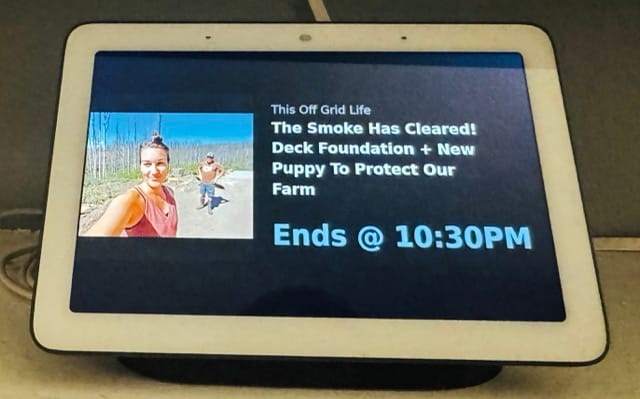
Home Assistant already had entities for both halves of this. A media_player tracking the Apple TV over AirPlay, and a media_player for the Nest Hub through the Cast integration. On paper, wiring the driveway camera side up was trivial, one action that plays a camera stream to a cast target. The now-playing card looked just as simple. It wasn't.
The catch
The driveway camera automation worked on the first try:
- action: camera.play_stream
  target:
    entity_id: camera.driveway_ptz_low_resolution_channel
  data:
    media_player: media_player.living_room_shelf
    format: hls
The now-playing card did not. My first attempt looked just as reasonable, a media_player.play_media call pointed at a generated thumbnail:
- action: media_player.play_media
  target:
    entity_id: media_player.living_room_shelf
  data:
    media_content_id: "https://example.com/thumbnail.jpg"
    media_content_type: image
I wired that into an automation that triggered on the Apple TV's media_title changing, pulled the artwork, and cast it with a title and subtitle overlay. Home Assistant reported success every single time. The media player's state cycled through idle, buffering, playing. The title updated. Everything about the API said it worked.
The Nest Hub's screen didn't change. At all.
Ruling things out, one at a time
The obvious suspect was the image itself, maybe the thumbnail was broken or the fetch was failing silently. I checked. It wasn't.
Next I suspected the Cast integration's URL validation, which turned out to be real but unrelated. Home Assistant's Cast component refuses to cast a media_content_id that resolves to its own host, whether that's a cloud URL or a plain LAN address:
Failed to cast media http://192.168.1.40:8123/local/now_playing_cast.jpg.
Please make sure the URL is: Reachable from the cast device and either
a publicly resolvable hostname or an IP address
That fix is real and worth keeping on its own merits. Reference local files through media-source://media_source/local/ instead of building a URL by hand, and Home Assistant resolves it into a signed, cast-safe URL automatically.
media_content_id: "media-source://media_source/local/now_playing_cast.jpg"That killed the error message. It did not put anything on the screen.
I kept narrowing it down. Real Jellyfin artwork over a plain HTTP URL, nothing. A photoMediaMetadata type instead of the generic one, nothing. The simplest possible test, a public image URL with zero moving parts:
media_content_id: "https://www.gstatic.com/webp/gallery/1.jpg"
media_content_type: image/jpeg
Home Assistant logged a clean success again. The Nest Hub sat there showing its ambient screensaver like nothing had happened.
At that point there was only one conclusion left. This specific device does not render generic image casts, on this Home Assistant version, full stop. Every layer I'd been debugging, metadata types, signed URLs, content types, was real, but none of it was the actual problem.
The proof was already on the same screen
The driveway camera automation had been working the entire time, on the same Nest Hub, through the same Cast integration. I'd been treating it as a separate feature instead of a clue, because casting a camera stream feels conceptually different from casting a photo.
It isn't, not to the device. A camera stream is video. That's the whole difference. This Nest Hub renders video casts fine and just does nothing visible with a plain image, no matter how it's addressed or labeled. Somewhere in the Cast "Default Media Receiver" on this device, static images and video streams take separate code paths, and only one of them is wired up to actually paint pixels.
Turning a photo into a video
The fix, once I stopped fighting it, was almost funny. Stop casting an image, and cast a 30 second silent video of the image instead. I think 30 seconds is plenty of time to see whats playing, what the time it will be done is.
ffmpeg was already sitting on the Home Assistant host, bundled in for camera and streaming support. That meant the whole now-playing card could be one generated clip: thumbnail on the left, channel name and title on the right, and a big, clearly labeled projected finish time pinned to the bottom.
ffmpeg -y -f lavfi -i "color=c=0x1c1c1e:s=960x360:d=30" \
  -loop 1 -i now_playing_cast.jpg \
  -f lavfi -i "anullsrc=r=8000:cl=mono" \
  -filter_complex "
    [1:v]scale=360:360:force_original_aspect_ratio=increase,crop=360:360[img];
    [0:v][img]overlay=0:0[bg1];
    [bg1]drawtext=fontfile=DejaVuSans.ttf:textfile=channel.txt:
         fontcolor=0xaaaaaa:fontsize=26:x=400:y=24[bg2];
    [bg2]drawtext=fontfile=DejaVuSans-Bold.ttf:textfile=title.txt:
         fontcolor=white:fontsize=32:x=400:y=64[bg3];
    [bg3]drawtext=fontfile=DejaVuSans-Bold.ttf:textfile=time.txt:
         fontcolor=0x8ab4f8:fontsize=56:x=400:y=h-th-24[vout]
  " \
  -map "[vout]" -map 2:a \
  -t 30 -r 2 -c:v libx264 -pix_fmt yuv420p -c:a aac -shortest \
  now_playing_cast.mp4
Cast that as video/mp4, and the Nest Hub showed it immediately. media_duration finally reported a real number instead of 0. This device I suppose only likes video casted to it, so we did just that.
The text gets written to files first, then read back with drawtext's textfile option, instead of sitting inline in the filter graph. Real titles contain colons, quotes, and apostrophes that would otherwise collide with ffmpeg's own filter syntax. That one decision avoided a whole second debugging session.
Giving Jellyfin content its own look
The thumbnail-left, text-right layout worked fine for YouTube, where the source thumbnail is already roughly square. It looked wrong for anything coming through Moonfin, though. Movie and show posters are portrait, and cropping one down into a small square just showed an oddly zoomed sliver of the art.
Jellyfin and Moonfin content gets a different treatment now: a full-bleed backdrop image filling the whole frame, with the movie or show's logo graphic centered near the bottom over a dark scrim. When an item doesn't have a logo in Jellyfin, which happens more than you'd expect, the title gets drawn as bold text in that same spot instead.
Picking the right artwork took its own fallback chain. Episodes rarely carry their own backdrop or logo, so the automation walks up to the season, then the series, until it finds one. Movies have neither a parent nor a series to fall back to, so they just use their own artwork directly.
Deciding whether an item qualifies for this treatment at all turned into the hardest bug of the whole project.
The bug that actually cost the most time
Even once the hero layout worked, it only showed up sometimes. The automation would flip between the backdrop treatment and the plain classic layout across nearly identical Jellyfin sessions, with no obvious pattern and nothing useful in the logs. This is the kind of bug that eats a weekend for a reason that has nothing to do with ffmpeg or Home Assistant at all.
The automation decides which layout to use with one boolean:
use_hero: "{{ true if (jf_active and jf_item and backdrop_owner) else false }}"An earlier version of that line just chained the three checks together with a plain "and." That seemed fine, but "and" in this language doesn't actually hand back true or false, it hands back whichever value made the decision. In this case, that was a Jellyfin ID, not a clean yes or no.
Most of the time that didn't matter, since the ID still counted as "something" wherever it showed up. But one specific check in Home Assistant is pickier about what counts as true, and an ID string doesn't qualify. So the same value passed one check and quietly failed another a few lines later.
Forcing it into a real true or false fixed it for good. That's what "sometimes works, sometimes doesn't" really was: one value being read two different ways by two parts of the automation that never agreed on what counted as true.
A few more landmines, for the record
shell_command doesn't run through a real shell. I assumed Home Assistant's shell_command integration passed commands through /bin/sh, the way you'd expect. It doesn't. For templated commands it execs the rendered, split argument list directly. A plain redirect using the greater-than sign silently did nothing, no error, no file, no clue. I stopped relying on shell syntax entirely and wrote text out from a oneliner Python instead:
write_text: >-
  python3 -c "import sys, pathlib;
  pathlib.Path('/media/' + sys.argv[1]).write_text(sys.argv[2])"
  {{ filename }} {{ text }}
A family member was watch a show on Jellyfin at their house and it threw this code off a bit. It was reporting the show they were watching not the show I was watching and their AppleTV was named "Apple TV" as well. Two Jellyfin clients were both named "Apple TV" and both running Moonfin for tvOS, one on the LAN, one connecting in over Tailscale from somewhere else. The only field that told them apart was ipAddress. Pinning the lookup to this Apple TV's reserved address fixed it for good:
{% for s in sessions %}
  {% if s.ipAddress == '192.168.1.XXX' %}
    {% set ns.item = s.item %}
  {% endif %}
{% endfor %}
Once there were three visual layouts to choose between, I ran into a wall: these shell command templates don't support if/else logic, just simple substitution. So instead of one command that branches internally, there are three separate commands now, one per layout, and the automation picks which one to call.
ffmpeg also choked when I fed it two images at once for the hero layout, a backdrop and a logo composited together. It would just hang. The fix was to flatten the images into a single frame first, then loop that one frame into the finished clip as a separate step.
A fresh video starting actually trips two triggers at once. Without a small delay on both, one would fire and finish before the other had even started, so the second run would cast right on top of the first. Giving both triggers the same five-second wait fixed it.
And a couple smaller ones: filenames need to be unique per run, since a superseded automation run keeps writing files in the background even after being canceled, and those files could clobber a newer run's output. Tagging every filename with the run's own ID took care of it.
Two automations sharing one screen
Both automations target the same media_player, so they need to stay out of each other's way. The now-playing automation checks that nobody's currently at the driveway before it takes over the display, so a movie card can't interrupt a driveway alert that's already showing:
conditions:
- condition: state
  entity_id: media_player.living_room_living_room
  state: playing
- condition: template
  value_template: "{{ states('binary_sensor.driveway_ptz_person_detected') != 'on' }}"
The driveway automation is the simpler of the two, since a camera stream is already video and never ran into the image problem at all:
- id: '1769820944383'
  alias: Cast Driveway PTZ to Living Room Shelf on Person
  triggers:
  - entity_id: binary_sensor.driveway_ptz_person_detected
    to: 'on'
    from: 'off'
    for:
      seconds: 5
    trigger: state
  actions:
  - action: camera.play_stream
    target:
      entity_id: camera.driveway_ptz_low_resolution_channel
    data:
      media_player: media_player.living_room_shelf
      format: hls
  - wait_for_trigger:
    - trigger: template
      value_template: "{{ states('binary_sensor.driveway_ptz_person_detected') ==
        'off' and (now() - states.binary_sensor.driveway_ptz_person_detected.last_changed).total_seconds()
        > 60 }}"
    timeout:
      minutes: 2
  - action: media_player.media_stop
    target:
      entity_id: media_player.living_room_shelf
  - action: media_player.turn_off
    target:
      device_id: 8daaa2c8139901046b0ac056bf49f32b
  mode: restart
The now-playing automation is longer, mostly because it tries to figure out a good title, channel, and thumbnail no matter what's playing, Jellyfin through Moonfin, a YouTube video, or anything else the Apple TV reports. The load bearing part is really just three steps buried inside it: write the channel, title, and finish time out to text files, composite them into a video with ffmpeg, then cast that video with play_media. Everything else, the Jellyfin session lookup, the YouTube thumbnail fallback, is optional flourish on top of that core trick.
shell_command:
  fetch_remote_thumbnail: "curl -4 -sf --max-time 5 -o /media/{{ dest }} \"{{ url }}\""

  write_np_text: "python3 -c \"import sys, pathlib; pathlib.Path('/media/' + sys.argv[1]).write_text(sys.argv[2])\" {{ filename }} {{ text }}"

  flatten_classic_frame: >-
    ffmpeg -y -f lavfi -i "color=c=0x1c1c1e:s=960x360:d=1"
    -loop 1 -i /media/np_{{ rid }}_cast.jpg
    -filter_complex "[1:v]scale=360:360:force_original_aspect_ratio=increase,crop=360:360[img];[0:v][img]overlay=0:0[bg1];[bg1]drawtext=fontfile=/usr/local/lib/python3.14/site-packages/env_canada/DejaVuSans.ttf:textfile=/media/np_{{ rid }}_channel.txt:fontcolor=0xaaaaaa:fontsize=26:line_spacing=6:x=400:y=24[bg2];[bg2]drawtext=fontfile=/usr/local/lib/python3.14/site-packages/aioslimproto/font/DejaVu-Sans-Bold.ttf:textfile=/media/np_{{ rid }}_title.txt:fontcolor=white:fontsize=32:line_spacing=8:x=400:y=64[bg3];[bg3]drawtext=fontfile=/usr/local/lib/python3.14/site-packages/aioslimproto/font/DejaVu-Sans-Bold.ttf:textfile=/media/np_{{ rid }}_time.txt:fontcolor=0x8ab4f8:fontsize=56:x=400:y=h-th-24[vout]"
    -map "[vout]" -frames:v 1 /media/np_{{ rid }}_flat.jpg

  flatten_hero_frame: >-
    ffmpeg -y -loop 1 -i /media/np_{{ rid }}_backdrop.jpg -loop 1 -i /media/np_{{ rid }}_logo.png
    -filter_complex "[0:v]scale=960:360:force_original_aspect_ratio=increase,crop=960:360[bg];[bg]drawbox=x=0:y=200:w=960:h=160:color=black@0.6:t=fill[bg2];[bg2]drawtext=fontfile=/usr/local/lib/python3.14/site-packages/env_canada/DejaVuSans.ttf:textfile=/media/np_{{ rid }}_channel.txt:fontcolor=0xcccccc:fontsize=20:x=(w-text_w)/2:y=208[bg3];[1:v]scale=-1:56[logo];[bg3][logo]overlay=(main_w-overlay_w)/2:236[bg4];[bg4]drawtext=fontfile=/usr/local/lib/python3.14/site-packages/aioslimproto/font/DejaVu-Sans-Bold.ttf:textfile=/media/np_{{ rid }}_time.txt:fontcolor=0x8ab4f8:fontsize=56:x=(w-text_w)/2:y=h-th-4[vout]"
    -map "[vout]" -frames:v 1 /media/np_{{ rid }}_flat.jpg

  flatten_hero_no_logo_frame: >-
    ffmpeg -y -loop 1 -i /media/np_{{ rid }}_backdrop.jpg
    -filter_complex "[0:v]scale=960:360:force_original_aspect_ratio=increase,crop=960:360[bg];[bg]drawbox=x=0:y=180:w=960:h=180:color=black@0.6:t=fill[bg2];[bg2]drawtext=fontfile=/usr/local/lib/python3.14/site-packages/env_canada/DejaVuSans.ttf:textfile=/media/np_{{ rid }}_channel.txt:fontcolor=0xcccccc:fontsize=20:x=(w-text_w)/2:y=188[bg3];[bg3]drawtext=fontfile=/usr/local/lib/python3.14/site-packages/aioslimproto/font/DejaVu-Sans-Bold.ttf:textfile=/media/np_{{ rid }}_title.txt:fontcolor=white:fontsize=30:line_spacing=6:x=(w-text_w)/2:y=218[bg4];[bg4]drawtext=fontfile=/usr/local/lib/python3.14/site-packages/aioslimproto/font/DejaVu-Sans-Bold.ttf:textfile=/media/np_{{ rid }}_time.txt:fontcolor=0x8ab4f8:fontsize=56:x=(w-text_w)/2:y=h-th-4[vout]"
    -map "[vout]" -frames:v 1 /media/np_{{ rid }}_flat.jpg

  encode_looped_video: >-
    ffmpeg -y -loop 1 -i /media/np_{{ rid }}_flat.jpg -f lavfi -i "anullsrc=r=8000:cl=mono"
    -t 30 -r 2 -c:v libx264 -preset ultrafast -pix_fmt yuv420p -c:a aac -shortest /media/np_{{ rid }}_cast.mp4

  cleanup_run_files: "python3 -c \"import sys, glob, os; [os.remove(f) for f in glob.glob('/media/np_' + sys.argv[1] + '_*')]\" {{ rid }}"

rest_command:
  youtube_search:
    url: "https://www.youtube.com/results?search_query={{ query | urlencode }}"
    method: GET
    headers:
      User-Agent: "Mozilla/5.0"
    timeout: 5

  jellyfin_sessions:
    url: "http://192.168.1.15:3000/api/Sessions?serverId=1"
    method: GET
    headers:
      Cookie: !secret streamystats_cookie
    timeout: 5
- id: '1786776621711'
alias: Cast Apple TV Now Playing to Living Room Shelf
description: Shows what's playing on the Living Room Apple TV on the Living Room
Shelf display, with richer Jellyfin/Moonfin metadata when applicable. Defers
to the driveway camera cast so the two never fight over the same display.
triggers:
- trigger: state
entity_id: media_player.living_room_living_room
to: playing
for:
seconds: 5
- trigger: state
entity_id: media_player.living_room_living_room
attribute: media_title
for:
seconds: 5
conditions:
- condition: state
entity_id: media_player.living_room_living_room
state: playing
- condition: template
value_template: "{{ states('binary_sensor.driveway_ptz_person_detected') != 'on' }}"
actions:
- variables:
run_id: "{{ context.id }}"
jf_active: "{{ state_attr('media_player.living_room_living_room','app_name') == 'Moonfin' }}"
is_youtube: "{{ state_attr('media_player.living_room_living_room','app_name') == 'YouTube' }}"
- if:
- condition: template
value_template: "{{ jf_active }}"
then:
- action: rest_command.jellyfin_sessions
response_variable: jf_sessions
- variables:
jf_item: >-
{% if jf_active and jf_sessions is defined %}
{% set sessions = jf_sessions.content %}
{% set ns = namespace(item=none) %}
{% for s in sessions %}
{% if ns.item is none and s.get('ipAddress','') == '192.168.1.213' %}
{% set ns.item = s.item %}
{% endif %}
{% endfor %}
{{ ns.item }}
{% else %}
{{ none }}
{% endif %}
pic: "{{ state_attr('media_player.living_room_living_room','entity_picture') }}"
show_title: "{{ (jf_item.get('name') if jf_item else none) or state_attr('media_player.living_room_living_room','media_title') or state_attr('media_player.living_room_living_room','app_name') or 'Now Playing' }}"
channel_name: "{{ (jf_item.get('seriesName') if jf_item else none) or state_attr('media_player.living_room_living_room','media_artist') or state_attr('media_player.living_room_living_room','app_name') or '' }}"
finish_clock: >-
{% set dur = state_attr('media_player.living_room_living_room','media_duration') %}
{% set pos = state_attr('media_player.living_room_living_room','media_position') %}
{% set upd = as_datetime(state_attr('media_player.living_room_living_room','media_position_updated_at')) %}
{% if dur and pos is not none and upd %}
{% set remaining = dur - pos - (now() - upd).total_seconds() %}
{{ (now() + timedelta(seconds=remaining)).strftime('%-I:%M%p') if remaining > 30 else '' }}
{% endif %}
finish_display: "{{ 'Ends @ ' ~ finish_clock if finish_clock else '' }}"
show_subtitle: "{{ channel_name ~ (' \u2022 ' ~ finish_display if finish_display else '') }}"
backdrop_owner: >-
{{ (jf_item.id if jf_item.get('backdropImageTags') else (jf_item.get('parentBackdropItemId') or jf_item.get('seriesId') or none)) if jf_item else none }}
logo_owner: >-
{{ (jf_item.id if (jf_item.get('imageTags') or {}).get('Logo') else (jf_item.get('seriesId') or none)) if jf_item else none }}
use_hero: "{{ true if (jf_active and jf_item and backdrop_owner) else false }}"
has_logo: "{{ 'true' if (use_hero and logo_owner) else 'false' }}"
- if:
- condition: template
value_template: "{{ use_hero }}"
then:
- action: shell_command.fetch_remote_thumbnail
data:
dest: "np_{{ run_id }}_backdrop.jpg"
url: "http://192.168.1.15:8096/Items/{{ backdrop_owner }}/Images/Backdrop"
- if:
- condition: template
value_template: "{{ has_logo == 'true' }}"
then:
- action: shell_command.fetch_remote_thumbnail
data:
dest: "np_{{ run_id }}_logo.png"
url: "http://192.168.1.15:8096/Items/{{ logo_owner }}/Images/Logo"
else:
- variables:
remote_url: >-
{{ ('http://192.168.1.15:8096/Items/' ~ jf_item.get('id') ~ '/Images/Primary') if (jf_item and jf_item.get('id'))
else (('https://i.ytimg.com/vi/' ~ yt_video_id ~ '/hqdefault.jpg') if (is_youtube and yt_video_id | default(false))
else (pic if (pic and pic.startswith('http'))
else ('https://placehold.co/640x360/1c1c1e/ffffff/png?text=' ~ ((channel_name ~ ' \u2014 ' ~ show_title) | truncate(50, True, '\u2026') | urlencode)))) }}
- if:
- condition: template
value_template: "{{ is_youtube and not (jf_item and jf_item.get('id')) }}"
then:
- action: rest_command.youtube_search
data:
query: "{{ channel_name }} {{ show_title }}"
response_variable: yt_search
- variables:
yt_video_id: >-
{% set m = yt_search.content | regex_search('\"videoId\":\"([a-zA-Z0-9_-]{11})\"') %}
{{ (yt_search.content | regex_findall_index(find='\"videoId\":\"([a-zA-Z0-9_-]{11})\"', index=0)) if m else none }}
remote_url: >-
{{ ('https://i.ytimg.com/vi/' ~ yt_video_id ~ '/hqdefault.jpg') if (yt_video_id | default(false))
else (pic if (pic and pic.startswith('http'))
else ('https://placehold.co/640x360/1c1c1e/ffffff/png?text=' ~ ((channel_name ~ ' \u2014 ' ~ show_title) | truncate(50, True, '\u2026') | urlencode))) }}
- action: shell_command.fetch_remote_thumbnail
data:
dest: "np_{{ run_id }}_cast.jpg"
url: "{{ remote_url }}"
- variables:
channel_shellsafe: >-
{{ "'" ~ (channel_name | wordwrap(24) | replace("'", "'\\''")) ~ "'" }}
title_shellsafe: >-
{{ "'" ~ (show_title | truncate(90, True, '\u2026') | wordwrap(24) | replace("'", "'\\''")) ~ "'" }}
finish_clock_shellsafe: "{{ \"'\" ~ finish_display ~ \"'\" }}"
- action: shell_command.write_np_text
data:
filename: "np_{{ run_id }}_channel.txt"
text: "{{ channel_shellsafe }}"
- action: shell_command.write_np_text
data:
filename: "np_{{ run_id }}_title.txt"
text: "{{ title_shellsafe }}"
- action: shell_command.write_np_text
data:
filename: "np_{{ run_id }}_time.txt"
text: "{{ finish_clock_shellsafe }}"
- if:
- condition: template
value_template: "{{ use_hero and has_logo == 'true' }}"
then:
- action: shell_command.flatten_hero_frame
data:
rid: "{{ run_id }}"
else:
- if:
- condition: template
value_template: "{{ use_hero }}"
then:
- action: shell_command.flatten_hero_no_logo_frame
data:
rid: "{{ run_id }}"
else:
- action: shell_command.flatten_classic_frame
data:
rid: "{{ run_id }}"
- action: shell_command.encode_looped_video
data:
rid: "{{ run_id }}"
- action: media_player.play_media
target:
entity_id: media_player.living_room_shelf
data:
media_content_id: "media-source://media_source/local/np_{{ run_id }}_cast.mp4"
media_content_type: video/mp4
extra:
metadata:
metadataType: 0
title: "{{ show_title }}"
subtitle: "{{ show_subtitle }}"
- delay:
seconds: 32
- action: media_player.media_stop
target:
entity_id: media_player.living_room_shelf
- action: shell_command.cleanup_run_files
data:
rid: "{{ run_id }}"
- action: media_player.turn_off
target:
device_id: 8daaa2c8139901046b0ac056bf49f32b
mode: restartA few notes if you're adapting either of these. The IP addresses and device ID are specific to this household and need to change for anyone reusing them. The two DejaVuSans font paths point at fonts bundled with other, unrelated HACS integrations, since there's no dedicated system font directory on this Home Assistant OS install. It works, but it's not something I'd call the right way to do it, just what was already sitting on the disk.
How it actually behaves day to day
Start something through Moonfin and the shelf display switches to the full backdrop treatment. When the movie or show has a logo, it sits centered near the bottom over the artwork. Without one, the title takes its place instead. YouTube and anything else keeps the original layout, thumbnail on the left, channel and title on the right. Either way, the same "Ends @ 1:47PM" line sits at the bottom, and it's gone again after about thirty seconds, cleaning up its own temp files as it goes.
Pause the video and start it again later, and the same trigger fires again with a fresh finish time, since the automation reads the Apple TV's current position and duration each time rather than remembering the first calculation. Walk up the driveway while something's playing, and the driveway feed wins instead, then hands the screen back once things are quiet.
None of the individual pieces here are exotic. ffmpeg's drawtext filter, media-source:// URIs, a REST session lookup, are all fairly ordinary Home Assistant tools. What made the difference was realizing this device already had a working video cast sitting right next to the broken image cast, and that the two behaving differently was the whole answer. A photo frame turned out to be a fine screen for showing more than photos, once I stopped asking it to show a photo.
We sometimes build things just to see if we can, sometimes we build things because its fun. Sure some of this is redundant such as the end time for a Jellyfin video but YouTube doesnt display this so why not.
Have you built anything like this? I'd love to hear it in the comments below!
Make a quick free acocunt here and leave a comment. It keeps the spammers out and lets me know people care about my adventures in technology.


Comments