
Most homelab remote apps pick a lane. You get one thing for Plex, another for the *arr stack, and a third for the servers underneath. Quartermaster, built by UK developer Lewis Egley, tries to cover all three from a single native iOS app. I have a bunch of mobile apps that have tried to do this and none come close to what Lewis has done.
What is a Quartermaster? A quartermaster is an official responsible for managing and distributing supplies and provisions (such as food, uniforms, and equipment) in the army, or for handling navigation and steering duties aboard a ship. Think of Q in James Bond but for this its how you are going to interact with your homelab via it's new Quartermaster.
The pitch is currently thirty services split into two halves. One half is entertainment. The other is what the app calls the "Command Centre", everything that keeps the entertainment half running.
The entertainment half
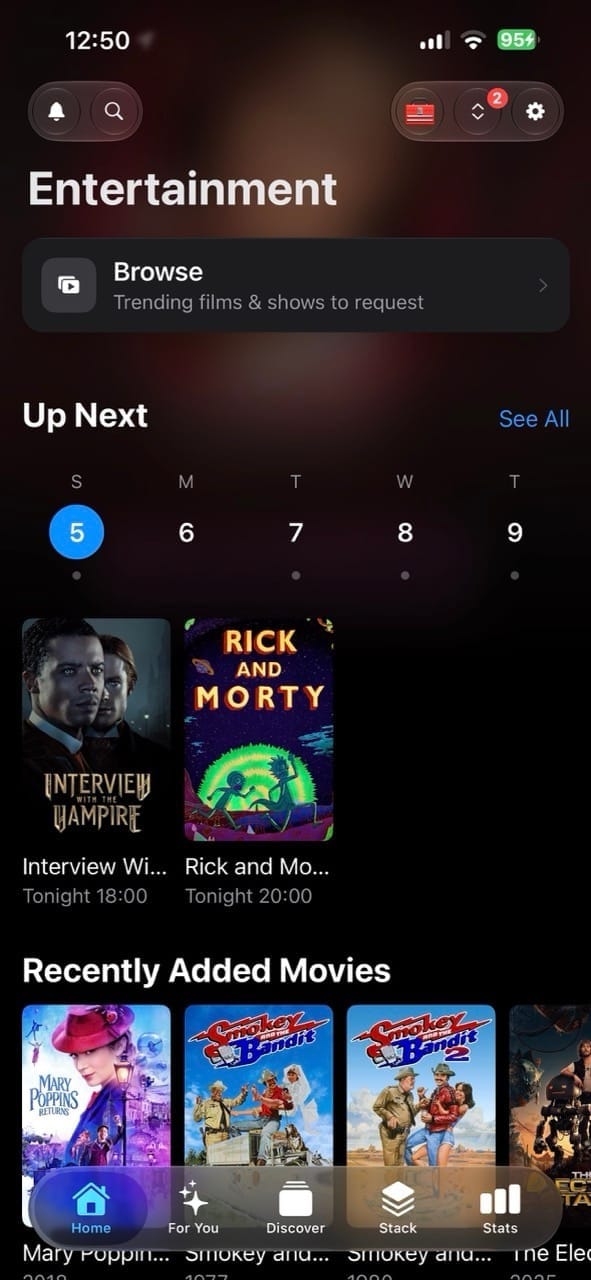
The home screen leads with an Up Next row for the week ahead, then Recently Added underneath. It reads as a single calm screen instead of a wall of separate widgets, which is usually where these apps end up once you've connected more than two or three services.
Radarr and Sonarr get full management inside the app: browse, search, add, edit, monitor. Lidarr gets a lighter touch, connection and live status rather than editing. My library runs all three, and the Radarr and Sonarr depth is the part I actually use daily.
Movies and show detail screens pull ratings from multiple sources into one line. There's a taste match score too, computed on the device from your own library and request history rather than pulled from somewhere else. Quality and file size sit next to the monitoring toggle, so a request doesn't need a separate screen.
Download clients get proper treatment as well. SABnzbd gets a full queue and history. NZBGet, qBittorrent, Transmission and Deluge show live status, with Transmission and Deluge going further into queue management: adding, pausing and removing torrents directly from the phone.
Bazarr surfaces a wanted list and lets you grab subtitles without opening a browser tab. Prowlarr and NZBHydra2 get connection and live status, which covers what most people actually need from an indexer manager on a phone screen.
For media servers, Plex, Jellyfin and Emby all get sessions, now playing, and recently added. Tautulli goes further, with full activity history and the ability to terminate a session remotely.
That last part matters more than it sounds. Someone transcoding a 4K file from three states away over hotel wifi is exactly the kind of thing you want to kill from your phone, not from a laptop you don't have open.
I run Jellyfin now, not Plex, so Tautulli isn't part of my stack anymore. What I'd actually want in its place is Streamystats support. If you're running Jellyfin, that's the equivalent tool, and right now it's missing from the list.
Reading and photo libraries round out this half. Komga and Kavita cover comics and ebooks. Immich covers photos, including job status and storage. Audiobookshelf shows library and listening progress.
The "Command Centre" half
Let's embrace the British spelling here. This is the half that actually separates Quartermaster from a typical media remote. Flip over and you get one screen that flags what needs attention: a stopped container, a degraded tunnel, downloads sitting blocked. Everything else stays quiet until it isn't.
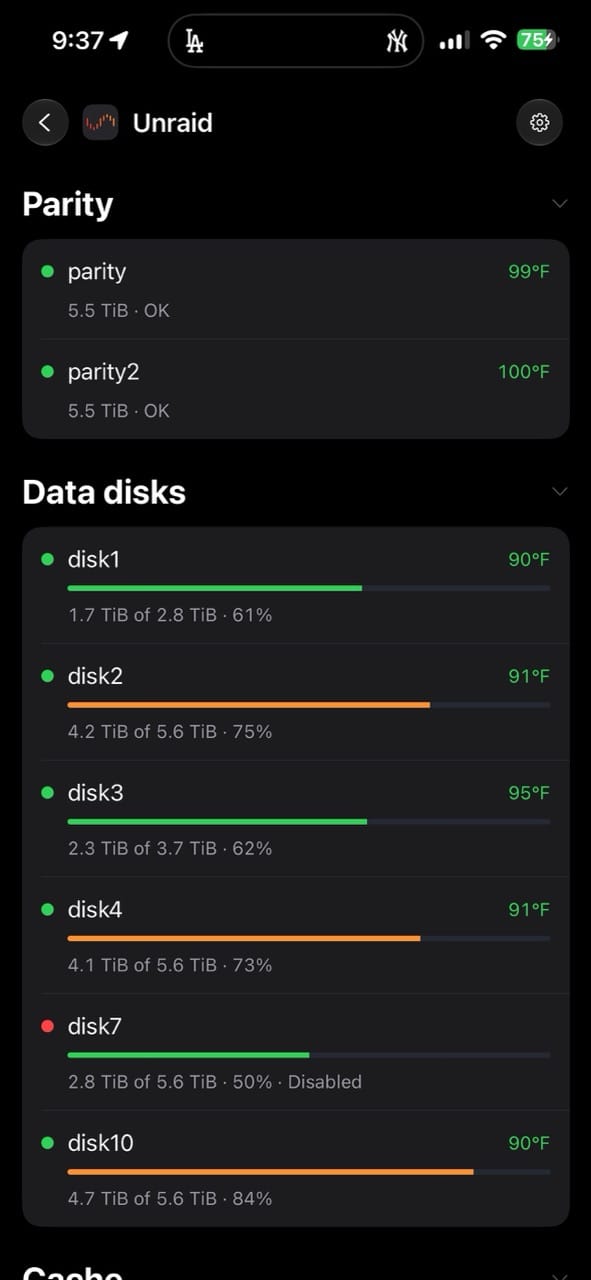
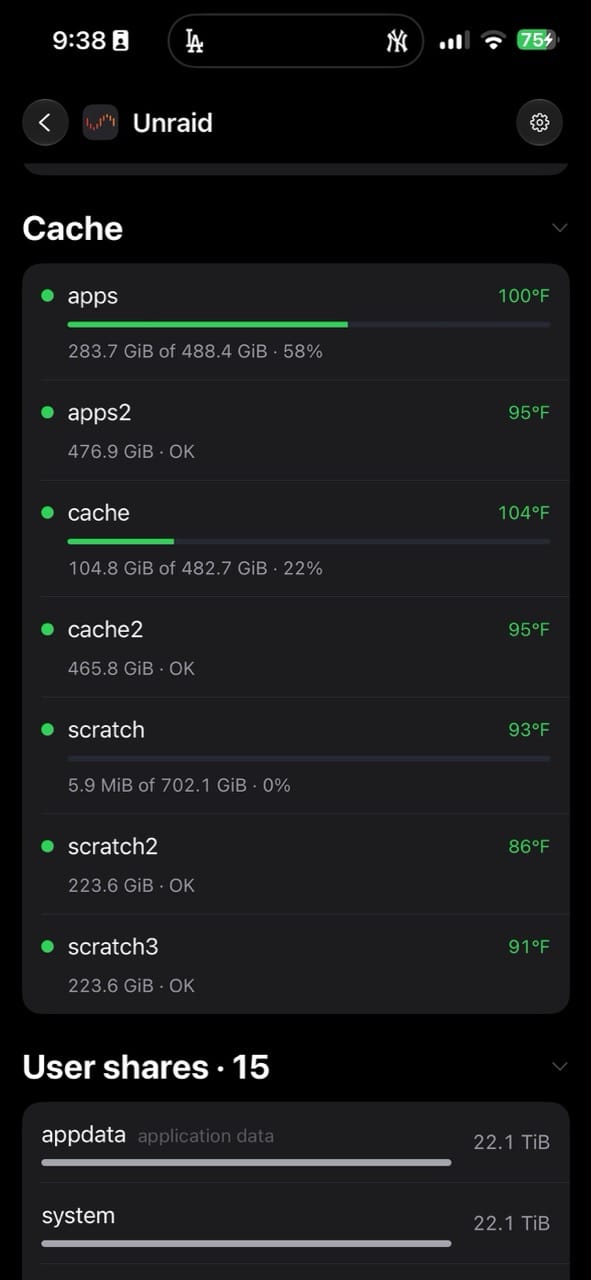
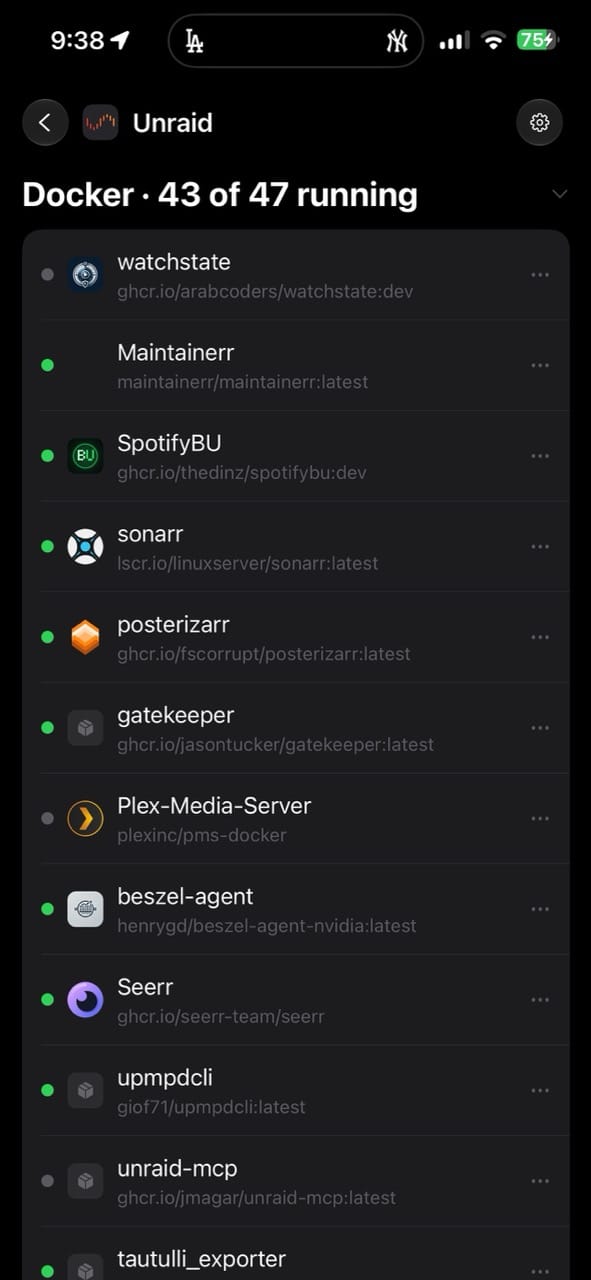
Portainer gets full container management, live stats plus start, stop and restart. Unraid gets array status, per disk temperature, and Docker and VM controls from the same screen. A disk running hot shows up here before you'd notice any other way, and the destructive actions sit behind a confirm step.
Network gets its own section. AdGuard Home and Pi-hole both get blocking stats and a pause toggle, useful for the ten seconds a smart TV app refuses to load without ads turned back on. Cloudflare covers tunnels, security and analytics, which lines up with running cloudflared alongside Tailscale rather than instead of it. Tailscale itself isn't on the list yet.
Glances covers general system stats: CPU, memory, disks, temperatures. Tdarr shows the transcode queue as a read only monitor, nothing more.
Home Assistant is the one that surprised me. Lights, locks, climate and scenes sit in the same app you'd use to check whether Sonarr grabbed last night's episode. It might be more than some people want in one place, but it's a wild thing to see working.
Alerts without a middleman
The part worth calling out is how notifications work. There's no company server sitting between your services and your phone. While the app is open, alerts fire the moment something finishes or fails.
When the app is closed, the alert has to come from somewhere you already control: a self-hosted ntfy instance, or Pushover, Discord, Telegram. Your Sonarr instance pushes straight to your own ntfy server, and that pushes to your phone. Nothing about a finished download passes through infrastructure Quartermaster runs.
Background checks for slower things, like storage filling up, run when iOS allows it. The app is upfront that this isn't a guarantee, which is a fair way to describe how background execution actually behaves on iOS rather than promising something the platform can't reliably deliver.
Every service the app supports
Here's the full list of thirty connected services, grouped the way the app groups them:
- Movies, TV & Music: Radarr, Sonarr, Lidarr
- Downloads: SABnzbd, NZBGet, qBittorrent, Transmission, Deluge
- Requests: Jellyseerr / Overseerr / Seerr, MusicSeerr
- Streaming: Jellyfin, Emby, Plex
- Books & Audiobooks: Komga, Kavita, Audiobookshelf
- Photos: Immich
- Smart Home: Home Assistant
- Activity & Stats: Tautulli
- Indexers & Subtitles: Prowlarr, Bazarr, NZBHydra2
- Network: AdGuard Home, Pi-hole
- Servers & Docker: Glances, Portainer, Unraid, Proxmox VE
- Media Processing: Tdarr
- More: Cloudflare
Let's talk about security
The app's website puts it plainly in the footer: a native iOS controller for your whole self-hosted stack, thirty services across two worlds, from your media to the homelab that runs it. Pure client. Credentials never leave your device. Built in the UK, made by one developer.
What that means in practice is you do the work. You go collect your own API keys from each service and enter them into the app yourself. Nothing is scraped or auto-discovered. If a key changes on your end, fixing it is on you, not the app.
Quartermaster also supports local-only access, which matters if you've got something like an iPad that never leaves the house. Point it at a plain 10.0.0.x or 192.168.0.x address and you're done. If you want more, Tailscale, Cloudflare, and header-based auth bypasses are all fair game too. But it also supports remote as well with Tailscale, Cloudflare, and header-based auth all ready to go to make a secure connection regardless of what ways you've set things up for yourself.
The app isn't opinionated about which of those you pick. It doesn't push you toward a specific setup, it just works with whatever you already have. And there's no server owned by the developer sitting in the middle. It's your device talking directly to your services.
Pricing
Free covers one service, fully. Pro unlocks everything on the features page for 14.99 once, or 3.99 a month if you'd rather pay as you go. With this many integrations on offer, that's not a hard number to justify once more than one or two things on the list are part of your actual stack.
Where it fits
If your homelab is just a media server and a couple of *arr containers, Quartermaster is more app than you need. It earns its place once the stack grows sideways: Unraid or Proxmox underneath, AdGuard or Pi-hole for DNS, Home Assistant tying the house into the same network.
My stack leans harder into Jellyfin than Plex these days, and Quartermaster treats both as first class citizens, sessions and continue watching either way. Readarr and Tailscale aren't on the list yet, so those stay outside the app for me. Streamystats support would close the gap Tautulli leaves behind for Jellyfin users like me.
How I'm using it
I have a few services that are exposed to the internet via Cloudflare Tunnel but all of my services are behind Tailscale. Personally anything I want to access outside of Cloudflare I'd use Tailscale for. It's my vpn of choice for this sort of thing. Unraid exposes all of my docker services that I use as hostname nodes in my tailnet so I'm just using those for my remote access. Local access I'm using my local hostnames and IP addresses and Quartermaster also detects what wifi you are on so it can switch gears with out you stressing.
My 3 week review of Quartermaster
There is a lot to be said about this app and how far it as come in the last 2 weeks of development. I've been using the test flight of the app and so many new features, services and integrations have been added to the app. There are also a bunch of great features coming down the pipeline in the next few updates that are going to make this app even better. (Search for missing episodes, poster states when items are being acquired, missing or not aired yet). This is one of those apps the dev actually uses himself, and it shows.
Unraid support has been rock solid, being able to see everything in one app has been great. I've been using an app called Unraid Deck and wow it almost rivals that and this is just some feature added to a big app.
The Lewis has added so much support for various services including request support in Seerr, and approvals of those requests. Shelfmark support has been added. It's wild that they have added Home Assistant support in the app which isn't something I'd have much use for since I use the official app but its a nice touch.
Beszel support allows for the app the see whats going on with your servers that are running Beszel agent, it's great!
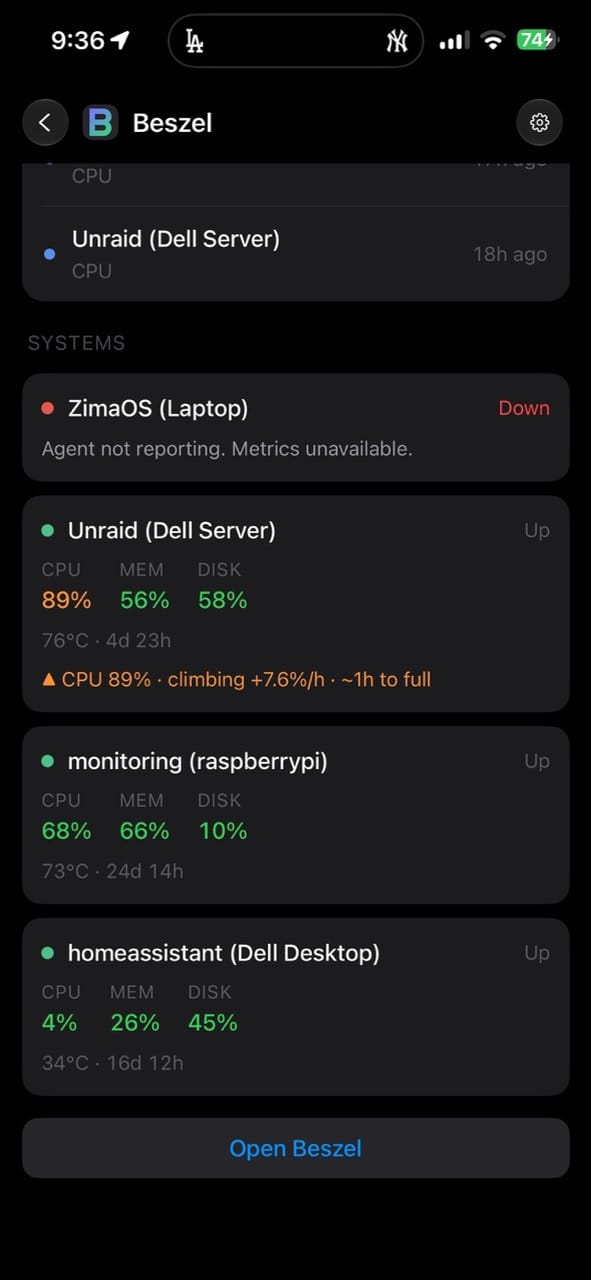
Being able to see the health of your Cloudflare tunnel has been handy. I'd imagine that Tailscale support will be added as well since, why not.
Using Needledrop for my music requests has been great. And my number one request for Streamystats to be added was and works smashingly well with much more coming with it such as Overview, Activity, Content lots of Deep Stats with watch hours and new playing row. I'm stoked about this one.
I'll circle back around in a few weeks and update you all on how this app is evolving.
8/3 - Proxmox support in Quartermaster has been a nice edition.
I wrote a recent blog post about Proxmox VE and mentioned that Quartermaster workes really well with it. If you havent tried it yet its quite nice, between that and Unraid it looks like its supporting some great Homelab friendly services.
Their website:
 Quartermaster
The iOS App:
 Lewis Egley


Comments